
ProcurementAgents in Procurement
Procurement assistant
For anyone who raises requisitions, and for buyers. Say what you need, for example "5 laptops for the new joiners by the 20th", and the assistant drafts the requisition: the catalogue item, quantity, needed-by date, an estimate from your rate contracts or the last purchase order, your department and how much budget is left. For an RFQ whose quotes are in, it compares the quotes and recommends one with its reasons. Nothing is created or awarded until you confirm, and it is done as you.
Before you start
- The agent must be hired for your company, and you must be allowed to use it. See Agents in Procurement.
- To draft a requisition you need the permission to raise requisitions or to manage purchasing. Without it you see "You can't raise purchase requisitions. Ask your admin for the permission."
- To compare and award quotes you need the permission to manage purchasing (buyers). Without it you see "Only people who manage purchasing can compare and award quotes."
Draft a requisition
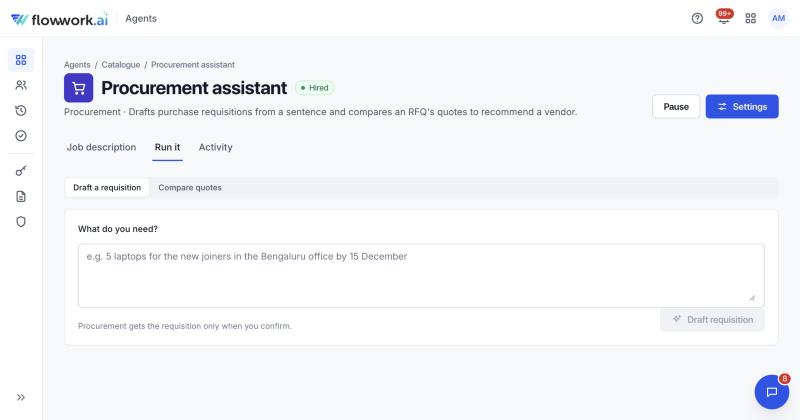
- Open Agents › Catalogue › Procurement assistant and select Run it.
- Under Task, keep Draft a requisition.
- In What do you need?, write what to buy, how many and by when, for example "5 laptops for the new joiners in the Bengaluru office by 15 December". You can also name a cost centre or a place to deliver to.
- Select Draft requisition.
- Check the draft: the title, the needed-by date, your department and cost centre, and the Lines table with each item, quantity and Estimate. Under each estimate it says where the price came from, for example "Rate contract with Sunrise Traders" or "Last purchase order".
- Read the Estimated total, the budget box and the notes.
- Tick Submit it for approval (otherwise it's saved as a draft) if you want it to go for approval straight away.
- Select Create requisition (or Create and submit), or Discard.
Read the full guide with your flowwork account
The rest of this page has the steps, screenshots and tips. Anyone at a company that uses flowwork can read every page, and ask the Help assistant about it.
Every step, in order Real screenshots The agents that help
New companies use flowwork free until 31 December 2026