
What Procurement does, and the menu
Procurement is where your company buys things. An employee asks for what they need in a requisition, approvers say yes, a buyer collects quotes from vendors and picks one, and a purchase order goes to the vendor. When the goods arrive, someone records them. Finance then enters the vendor's bill and pays it in Books. Vendors keep their own details, quote and see their orders in a separate vendor portal.
Before you start
- Open Procurement from the app launcher (the grid at the top). It's called Procurement.
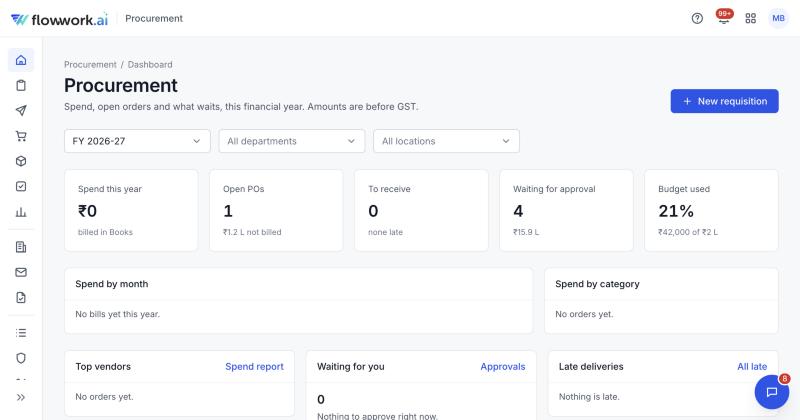
- What you see depends on your permissions. Everyone who takes part in purchasing opens on the Dashboard: buyers, approvers and admins see the company's figures, and people who only raise requisitions or record receipts see their own. People who only work with vendors open on Vendors.
- Without any Procurement permission you see Procurement isn't turned on for you. Ask your admin. See Who can do what.
- Your account should be linked to your employee record in People. Procurement reads your department and reporting manager from there to find your approvers and your department's budget.
From request to payment
- Requisition. An employee raises a requisition: what they need, how many, by when, and an estimate. Items from the catalogue fill in the unit, GST rate and price. They submit it.
- Approval. The approval rules decide who approves: for example the reporting manager, the department head or named people, depending on amount, category or department. A budget that would go over can add a first step for its budget approvers, or refuse the requisition.
- RFQ and quotes. A buyer selects Ask for quotes on the approved requisition and sends a request for quotation (RFQ) to vendors. Vendors quote in the vendor portal, or the buyer records quotes that came by email.
- Award. The buyer compares the quotes and selects Award. Picking a quote other than the recommended one, or awarding with fewer quotes than your company asks for, needs a reason. Awarding makes a draft purchase order.
- Purchase order. The buyer checks the order and submits it. Purchase orders have their own approval rules. Once approved, the buyer selects Send to vendor. The vendor gets the PDF by email and acknowledges it in the portal.
- Goods receipt. When the goods arrive or the service is done, the requester, a buyer or stores staff select Record receipt on the order and say what was received, accepted and rejected.
- Bill in Books. Finance enters the vendor's bill in Books from the order (Enter bill on the order's Bills tab). Books checks the bill against the order and the receipts (3-way match).
- Payment in Books. The bill is paid in Books. The order's Bills tab shows each bill as Not paid, Part paid or Paid.
Not every purchase needs every step. A buyer can order directly from an approved requisition without an RFQ (Order directly). When the catalogue has agreed rates from one vendor for every item, Create PO from contract makes the order at those rates.
Read the full guide with your flowwork account
The rest of this page has the steps, screenshots and tips. Anyone at a company that uses flowwork can read every page, and ask the Help assistant about it.