
ProcurementVendors
Vendor contracts and renewal reminders
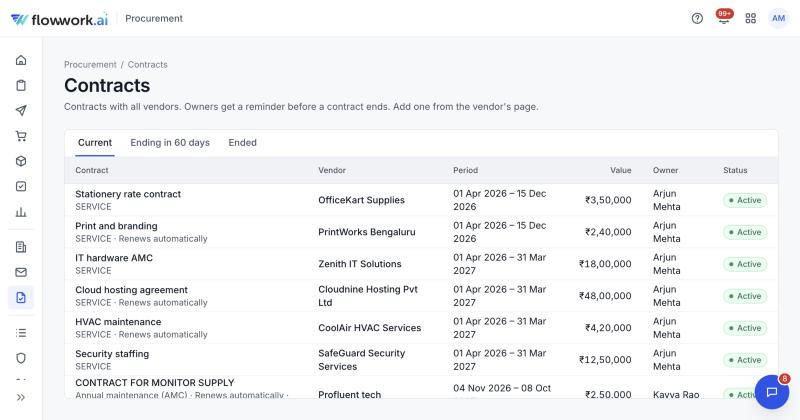
Keep your rate contracts, AMCs, service agreements and NDAs with each vendor, with their dates, value and the signed copy. The contract's owner gets a reminder before it ends, so nothing renews or lapses by surprise. Vendors › Contracts lists the contracts with all vendors.
Before you start
- Anyone who can view vendors can see contracts.
- To add, edit or remove contracts you need manage vendors or approve vendors.
- Upload the signed copy on the vendor's Documents tab first if you want to link it. See The vendor page.
Steps: add a contract
- Open the vendor and select the Contracts tab.
- Select Add contract.
- Fill in Title, for example "Annual maintenance – printers".
- Pick a Kind (optional): Rate contract, Annual maintenance (AMC), Services, Supply, NDA or Other.
- Choose Starts and Ends. Both are optional, but without an end date there's no reminder.
- Enter the Value in rupees, or leave it empty for a rate contract.
- Choose Remind before it ends: 7, 15, 30, 45, 60 or 90 days. The default is 30.
- Tick Renews automatically if it does.
- In Signed copy, pick the file from the vendor's documents.
- Add Notes if you like and select Save contract.
The Owner is you. Only the owner gets the reminder. The owner must be a user of your company, and the name shown comes from your company's user list.
Read the full guide with your flowwork account
The rest of this page has the steps, screenshots and tips. Anyone at a company that uses flowwork can read every page, and ask the Help assistant about it.
Every step, in order Real screenshots The agents that help
New companies use flowwork free until 31 December 2026