
ProcurementVendors
Vendor bank accounts
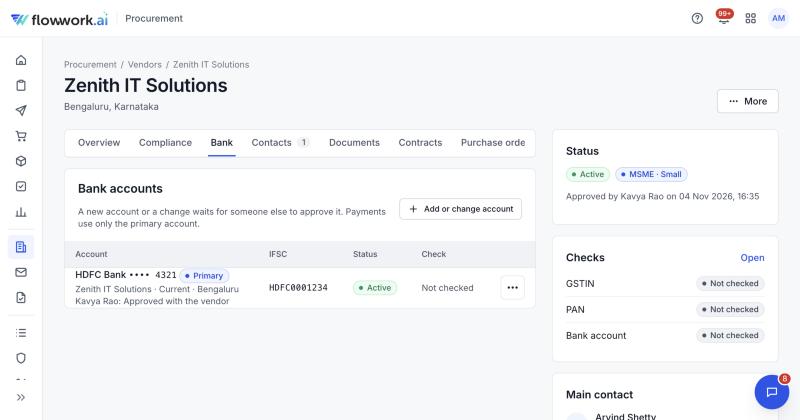
The Bank tab on a vendor holds the accounts you pay the vendor into. A changed bank account is a common fraud route, so every new account or change waits for a second person to approve it, numbers are shown masked, and every look at a full number is logged.
Before you start
- To add or change an account you need manage vendors or approve vendors.
- To approve or reject a new account you need approve vendors, and you can't be the person who asked for it.
- To see full account numbers you need the View vendor bank details permission. You also need a permission to see vendors; the bank permission alone doesn't open the app. The Procurement Administrator and Finance manager roles have it; Procurement Buyer doesn't.
Steps: add or change a bank account
- Upload the cancelled cheque on the vendor's Documents tab first, with type Cancelled cheque. It's optional, but it helps the approver.
- Open the Bank tab and select Add account (or Add or change account).
- Fill in Account holder name (it should match the vendor's legal name), Account number and Account number again. You can't paste into the second box.
- Fill in IFSC and choose Account type: Current, Savings or Business. Bank and Branch are optional.
- In Cancelled cheque, pick the file you uploaded.
- When the vendor already has an approved account, leave Use for payments once approved (make primary) ticked to switch payments to the new account, or untick it to keep it as a spare.
- Select Send for approval (or Add account for a vendor that isn't approved yet).
The account number must be 9 to 18 digits and the IFSC 11 characters with 0 as the fifth, like HDFC0000523. An account already on the vendor (same number and IFSC) is refused.
Read the full guide with your flowwork account
The rest of this page has the steps, screenshots and tips. Anyone at a company that uses flowwork can read every page, and ask the Help assistant about it.
Every step, in order Real screenshots The agents that help
New companies use flowwork free until 31 December 2026