
HR letter writer
For HR and employees. It fills experience letters, employment certificates, address proof letters, salary certificates, NOCs, relieving letters, confirmation letters and probation extension letters from your company's wording and the employee's record in People. Salary certificates also use the latest payslip. HR checks the letter and issues it: the PDF goes into the employee's documents, to the employee's email, or both. Employees can ask for their own letters; HR always issues them.
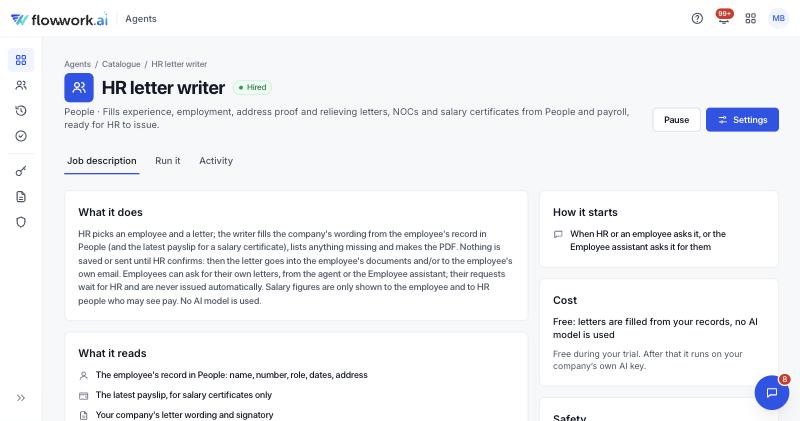
What it does
It reads, with your own login:
- the employee's record in People: name, employee number, designation, department, date of joining, relieving date and residential address (permanent, else communication address)
- for a salary certificate only, the latest regular payslip in Payroll: yearly CTC, the month, gross and net pay, and the earnings of that month
- your company's letter wording, signatory and letterhead address from the letter writer's Setup
| Letter | What it says |
|---|---|
| Experience letter | Dates of service and last role, for a former employee |
| Employment certificate | The person works here now, with role and joining date |
| Address proof letter | Employment proof with the residential address on the record |
| Salary certificate | Yearly CTC and the latest month's gross and net pay |
| No objection certificate | No objection to what the employee asks for, such as a passport or visa. Needs a purpose. |
| Relieving letter | The employee was relieved on the last working day |
| Confirmation letter | Employment is confirmed after probation, from a date |
| Probation extension letter | Probation is extended, and until when |
If a value the letter needs is missing, the letter lists it. A letter with missing values can't be issued.
Read the full guide with your flowwork account
The rest of this page has the steps, screenshots and tips. Anyone at a company that uses flowwork can read every page, and ask the Help assistant about it.