
PeopleLeave and holidays
Holidays and holiday lists
A holiday list is the set of holidays for one year, for example "India 2026" or "Bengaluru office 2026". It has public holidays, optional holidays employees can choose to take, and weekly offs. Each employee follows one list: the one set on their profile, or the company's default list for the year. Leave doesn't count the holidays in that list.
Before you start
- Everyone can see holiday lists under People › Holidays.
- To add or change them, you need the permission to manage holiday lists. See Who can see what.
See the holidays
- Go to People › Holidays. Pick the Year.
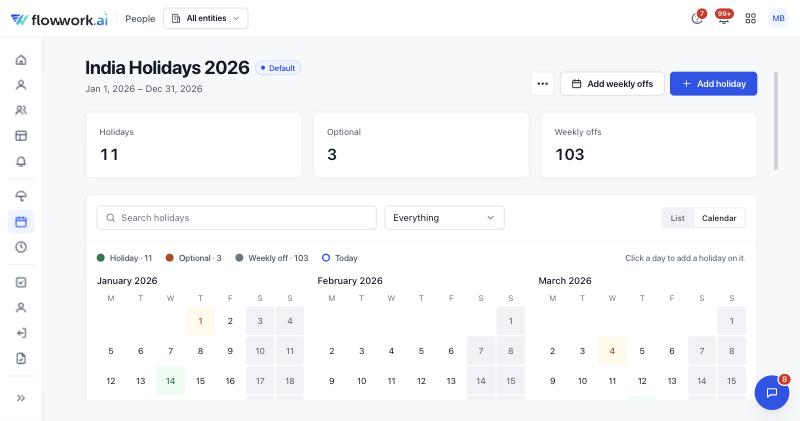
- Select a list. The cards show how many Holidays, Optional days and Weekly offs it has.
- Search by name, or under Show choose Holidays only or Weekly offs only.
- Switch between List and Calendar. The calendar shows each month of the list, coloured by type. Point at a day to see its name.
Read the full guide with your flowwork account
The rest of this page has the steps, screenshots and tips. Anyone at a company that uses flowwork can read every page, and ask the Help assistant about it.
Every step, in order Real screenshots The agents that help
New companies use flowwork free until 31 December 2026