
PeopleOnboarding, offboarding and contracts
Onboarding
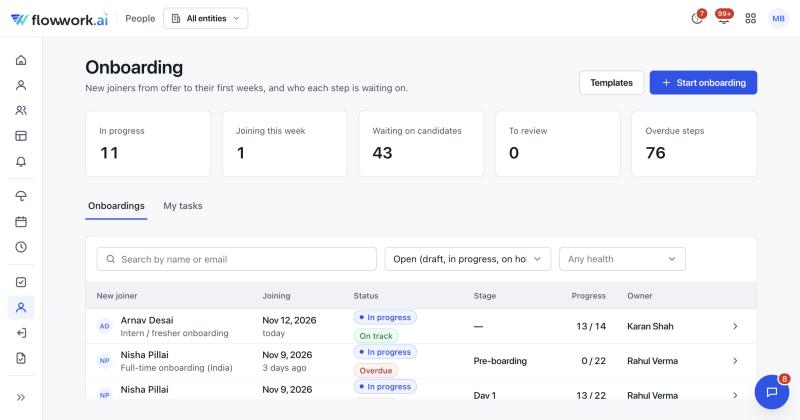
People › Onboarding lists every new joiner from offer to their first weeks, and shows who each step is waiting on. Each new joiner has one onboarding, made from a template you set up once.
Before you start
- You see Onboarding in the side menu when you have any onboarding permission: view, add, update, delete or manage employee onboarding. See Who can see what.
- To see every onboarding, you need to view, add, update or delete employee onboarding. Without that, the page shows only your own steps (see My tasks).
- To start one, you need add employee onboarding, and at least one published template. See Onboarding and offboarding templates.
How an onboarding is built
- Template: the plan you set up in Settings. It has stages and steps. Each onboarding keeps the template version it started with, so later changes to the template don't touch it.
- Stages group the steps and decide when they open: at launch, when the previous stage is done, or on a date (for example the joining date). The usual stages are Pre-boarding, Day 1 and Post-boarding.
- Steps are the work. Each step has a type, a person who does it, and usually a due date counted from the joining date.
Step types:
- Task: a to-do, often with a checklist.
- Content: something to read or watch.
- Form: collects details, using a built-in employee form (personal, contact and address, emergency contacts, bank, education, experience) or your own custom form.
- Document upload: collects files such as ID proof and certificates.
- Policy acknowledgement: the person reads and accepts company policies.
- Approval: one or more people approve before work continues.
- Automation: creates the employee on the joining day, or sends an email.
- Background check: employment, education, address and court checks by your verification vendor.
A step can be done by the Candidate (new joiner), the Onboarding owner (HR), the Reporting manager, the Buddy, Specific people, or a Team queue (by permission). The new joiner does their steps in the candidate portal.
Read the full guide with your flowwork account
The rest of this page has the steps, screenshots and tips. Anyone at a company that uses flowwork can read every page, and ask the Help assistant about it.
Every step, in order Real screenshots The agents that help
New companies use flowwork free until 31 December 2026