
PeopleLeave and holidays
Apply for leave
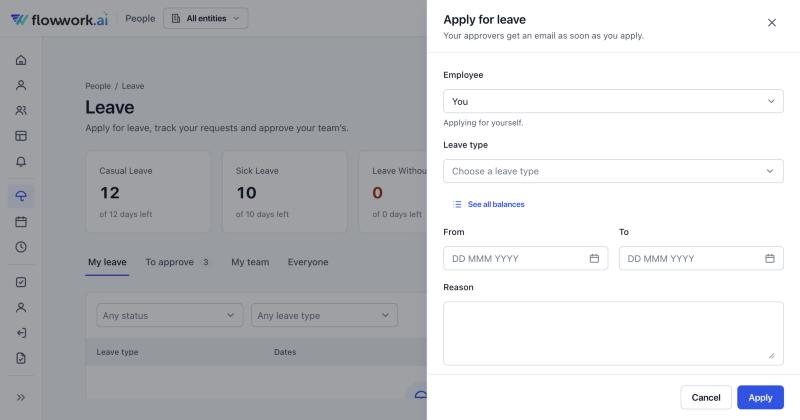
Ask for time off: pick the leave type, the dates and, for each day, a full day or a half. Your approvers get an email and decide. You can change a request while it waits, cancel it, or ask to cancel leave that's already approved.
Before you start
- Your sign-in must be linked to your employee record in People. Without it you don't see Apply for leave.
- A leave type shows in the list only if it applies to you. Leave types with a fixed number of days also need a balance given to you (a leave assignment). See Leave assignments.
- Your approver is filled in from your reporting manager in your work details. Ask HR to set it if it's empty.
- HR can apply on someone's behalf with the permission to see everyone's leave. See Who can see what.
Fill in the request
- Go to People › Leave and select Apply for leave.
- HR only: under Employee, search for the person. Leave it on yourself to apply for your own leave.
- Choose the Leave type. Types with a balance show how many days you have left, for example "Casual leave · 4 days left". Select See all balances to check every type.
- Choose From and To.
- flowwork lists each working day between the dates. For each one, choose Full day, First half or Second half. Below the days you see the total and, for types with a balance, the days left after this request.
- Write the Reason.
- Check the Approver. Add people under Also approves if someone else must approve too.
- Optionally, add people under Let them know. They get an email but don't approve.
- If the leave type asks for proof, attach it under Proof: PDF, JPG or PNG, up to 5 MB each.
- Select Apply.
You'll see Leave applied, or Leave added for a leave type that's approved automatically.
Read the full guide with your flowwork account
The rest of this page has the steps, screenshots and tips. Anyone at a company that uses flowwork can read every page, and ask the Help assistant about it.
Every step, in order Real screenshots The agents that help
New companies use flowwork free until 31 December 2026