
PeopleOnboarding, offboarding and contracts
Candidate portal
New joiners don't have a flowwork sign-in before they join. They do their onboarding steps in the candidate portal instead: a simple page that works on a phone, opened from the invitation email and protected by a 6-digit code. This page explains what the new joiner sees, and the one-time setup HR needs.
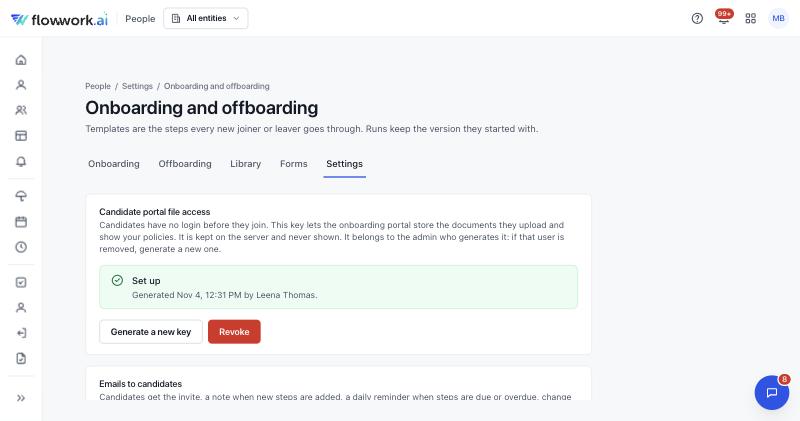
Before you start (HR)
- Set up file access once for your company, or new joiners can't upload documents or open your policies:
- Go to Settings › Onboarding and offboarding and open the Settings tab.
- Under Candidate portal file access, select Generate key, then Generate key again to confirm.
- The card shows Set up with the date and who generated it.
- You need permission to manage onboarding templates to see this card.
- The key belongs to the person who generates it. If that person's account is removed, select Generate a new key. Use an admin account that will stay. Revoke stops uploads and policies in the portal until a new key is made.
- The key is kept on the server and never shown.
- The template must have Invite the candidate to complete their steps online turned on (it is by default). See Onboarding and offboarding templates.
Read the full guide with your flowwork account
The rest of this page has the steps, screenshots and tips. Anyone at a company that uses flowwork can read every page, and ask the Help assistant about it.
Every step, in order Real screenshots The agents that help
New companies use flowwork free until 31 December 2026