
PeopleOnboarding, offboarding and contracts
My tasks
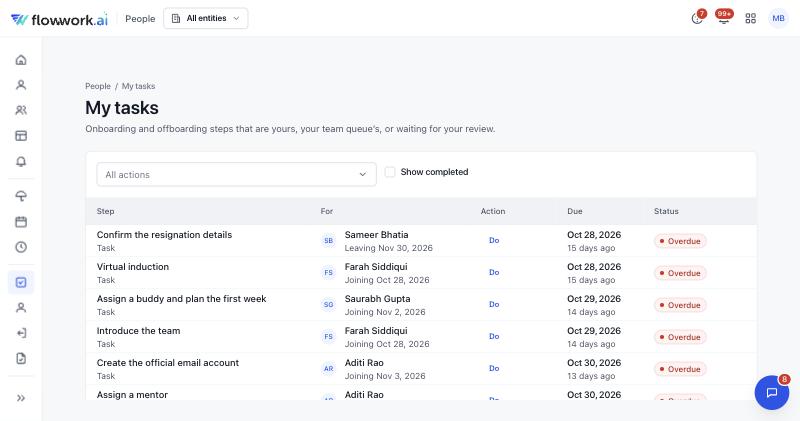
People › My tasks lists every onboarding and offboarding step that's waiting for you: steps assigned to you, steps waiting for your review or approval, and steps in a team queue you belong to. Managers, buddies, IT, admin and finance teams work from here. A leaving employee does their own offboarding steps here too.
Before you start
- Everyone sees My tasks in the side menu. You don't need an onboarding permission.
- Team queue steps (for example IT clearance) show only if you have that queue's permission, such as IT clearance, Admin clearance or Finance clearance.
Read the list
Each row shows:
- Step: its name and type. "team queue" means anyone in the queue can take it.
- For: the new joiner or leaving employee, with their joining or last working day. Select the name to open the onboarding or offboarding.
- Action: Do, Review, Approve or Claim.
- Due: the due date and how far away it is.
- Status, or Overdue.
Use All actions to show only To do, To review, To approve or Team queue. Tick Show completed to see steps you've finished.
The same list is on the My tasks tab of People › Onboarding and People › Offboarding, where it shows only that process's steps.
Read the full guide with your flowwork account
The rest of this page has the steps, screenshots and tips. Anyone at a company that uses flowwork can read every page, and ask the Help assistant about it.
Every step, in order Real screenshots The agents that help
New companies use flowwork free until 31 December 2026