
PeopleOnboarding, offboarding and contracts
Run an onboarding
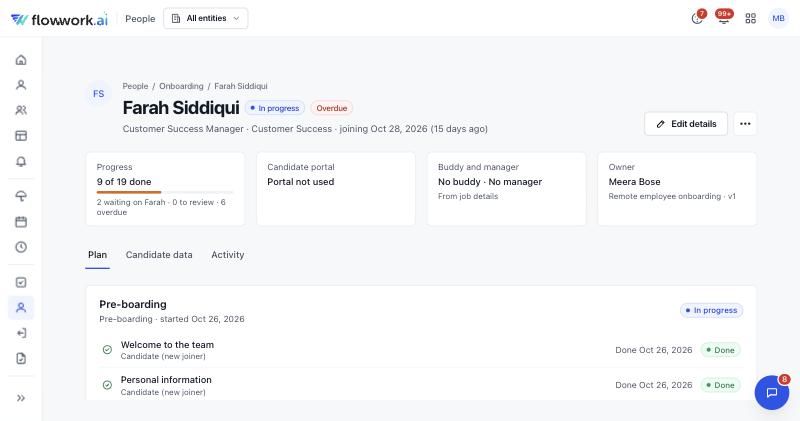
Each onboarding has its own page. You see the plan, open steps to do or review them, and manage the onboarding: edit details, put it on hold, resend the invite or cancel it.
Before you start
- HR with view, add, update or delete employee onboarding can open any onboarding. The owner, collaborators, the reporting manager, the buddy and anyone with a step can open the ones they're part of.
- To manage it (edit, launch, hold, resume, resend or revoke the invite, and the step actions below), you need update employee onboarding or be its owner.
- To cancel it or delete a draft, you need delete employee onboarding.
- To see bank numbers and other sensitive values, you need view employee sensitive data. Others see them hidden.
Read the page
The header shows the new joiner, the status, the health, the designation, department and joining date.
The four cards show:
- Progress: steps done, and how many are waiting on the new joiner, to review or overdue.
- Candidate portal: when they were invited and last visited, or Employee created · uses regular sign-in after the joining day.
- Buddy and manager.
- Owner, the template, its version, and whether it came from a Recruit offer.
The tabs:
- Plan: the stages and their steps, with who does each, the due date and status. Select a step to open it.
- Candidate data: what the new joiner has entered, by section (personal, contact, emergency contacts, bank, education, experience, documents, accepted policies). Documents waiting for review are marked Awaiting review in the step. Only HR with onboarding access and the owner can see this tab.
- Activity: everything that happened, newest first: launches, steps done, reviews, reminders, portal sign-ins.
Read the full guide with your flowwork account
The rest of this page has the steps, screenshots and tips. Anyone at a company that uses flowwork can read every page, and ask the Help assistant about it.
Every step, in order Real screenshots The agents that help
New companies use flowwork free until 31 December 2026