
PeopleStart here
What People does, and the menu
People is your company's employee records and everything around them. Everyone sees their own profile, applies for leave and checks holidays. Managers approve their team's leave. HR keeps the employee list, onboards and offboards people, sends contracts and sets up departments, leave types and the other People settings.
Before you start
- Open People from the app launcher (the grid at the top right) and select People.
- What you see in the menu depends on your permissions and on what your company has switched on. Two people in the same company can see different menus. See Who can do what.
The menu
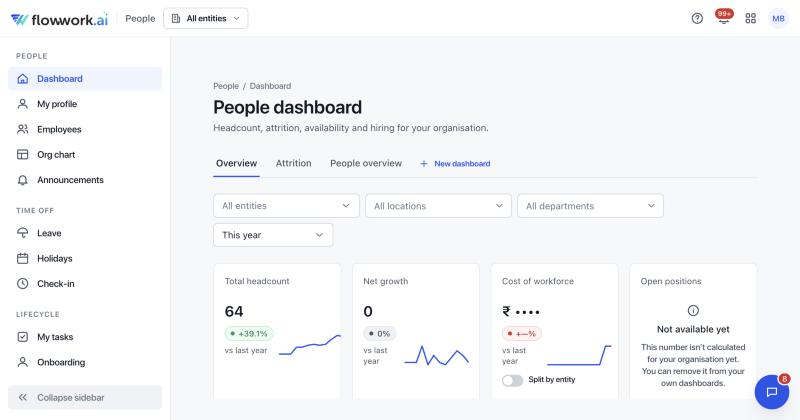
The menu has four groups.
People
| Item | What it's for | Who sees it |
|---|---|---|
| Dashboard | Headcount, attrition, leave and other charts. | Everyone. What's on it depends on your permissions. See The People dashboard. |
| My profile | Your own employee record. | Everyone who has an employee record |
| Employees | The employee list. | Everyone. Without permission to view employees, you only find yourself in it. |
| Org chart | Who reports to whom. | Everyone |
| Announcements | Company news and notices. | Everyone |
Time off
| Item | What it's for | Who sees it |
|---|---|---|
| Leave | Apply for leave, see your requests, and approve your team's. | Everyone |
| Holidays | Your holiday list for the year. | Everyone |
| Check-in | Opens the Attendance app. | Only when your company uses Attendance |
Lifecycle
| Item | What it's for | Who sees it |
|---|---|---|
| My tasks | Onboarding and offboarding steps assigned to you. | Everyone |
| Onboarding | New joiners being onboarded. | People with any onboarding permission (view, add, update, delete or manage) |
| Offboarding | Employees who are leaving. | People with any offboarding permission (view, add, update, delete or manage) |
| Contracts | Contracts sent to employees for signing. | People who can manage contracts |
Setup
| Item | What it's for | Who sees it |
|---|---|---|
| Settings | Departments, designations, leave types, holidays, templates and other People settings. | People with access to settings. Outside accountants and other partner users never see it. |
A group with nothing in it for you isn't shown.
Read the full guide with your flowwork account
The rest of this page has the steps, screenshots and tips. Anyone at a company that uses flowwork can read every page, and ask the Help assistant about it.
Every step, in order Real screenshots The agents that help
New companies use flowwork free until 31 December 2026