
Offboarding
When someone resigns or is leaving, start their offboarding in People › Offboarding. It runs the exit from notice period to after the last day: handover, exit interview, IT, admin and finance clearances, deactivating the sign-in, and settlement and letters. It works the same way as onboarding, from an offboarding template.
Before you start
- You see Offboarding in the side menu with any offboarding permission. To see every offboarding you need view, add, update or delete employee offboarding.
- To start one you need add employee offboarding. To manage one (edit, launch, hold, resume, step actions) you need update employee offboarding or be its owner. To cancel it or delete a draft you need delete employee offboarding.
- IT, admin and finance teams need IT clearance, Admin clearance or Finance clearance to work their clearance queues.
- A published offboarding template is needed. Start from Standard offboarding (India) in the library. See Onboarding and offboarding templates.
- See Who can see what.
The Offboarding page
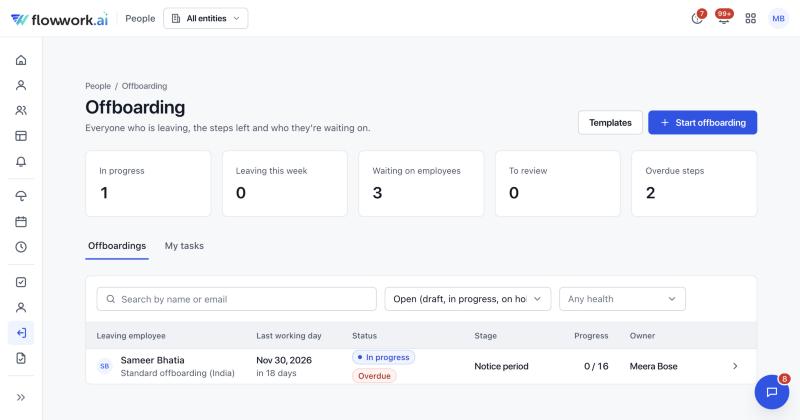
The tiles count In progress, Leaving this week, Waiting on employees, To review and Overdue steps, and Need attention when an automatic step failed. In progress and Overdue steps filter the list.
The list shows each Leaving employee with the template, the Last working day, Status and health, current Stage, Progress and Owner. Search by name or email and filter by status and health, as on Onboarding.
Read the full guide with your flowwork account
The rest of this page has the steps, screenshots and tips. Anyone at a company that uses flowwork can read every page, and ask the Help assistant about it.