
PayrollAgents in Payroll
Agents in Payroll
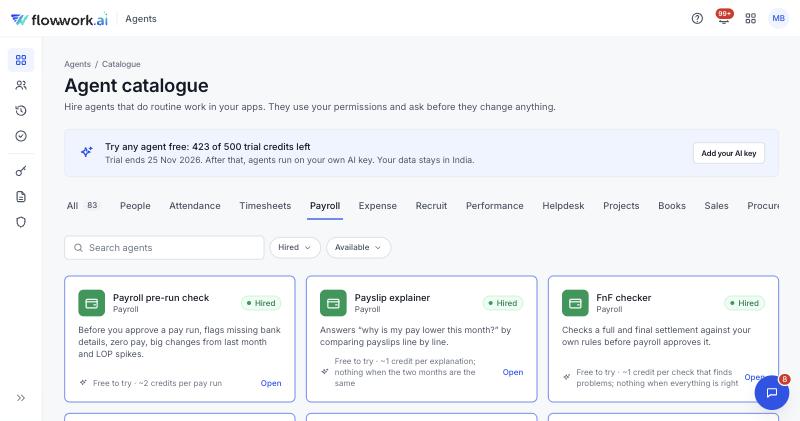
Nine agents in the Payroll tab of the agent catalogue help payroll teams and employees. Some check work before you approve it: a pay run, a full and final settlement, an investment proof, a quarterly TDS return. Some answer employees' questions about their pay and tax. Others keep track of compliance and the leave encashment liability. Each agent works with your own login, so it sees only what you can see in Payroll. None of them approves, pays or files anything.
Before you start
- Agents are a paid add-on. AI agents must be switched on for your company. If you don't see Agents in flowwork's menu, ask your admin.
- An agent must be hired before anyone can use it. You need the Manage agents permission to hire one. Go to Agents › Catalogue, select the Payroll tab, open the agent and select Hire agent.
- When your admin hires an agent, they choose Who can use it: everyone in the company, or Only people with some roles. They also set a Monthly credit limit. The agent stops for the month when it reaches the limit.
- You also need the payroll permissions each agent asks for. Most payroll agents read other people's pay, so they need View employee payroll sensitive data or a payroll permission. The employee agents (Payslip explainer, Tax planner) only read your own pay. See each agent's page.
Payroll agents
| Agent | What it does | Changes only after your Confirm | Cost (estimate) |
|---|---|---|---|
| Payroll pre-run check | Compares a pay run with the last approved one and lists what to check before you approve: no bank details, zero pay, people missing, big net pay changes, loss-of-pay spikes. | Nothing: it only reads | About 2 credits per pay run |
| Payslip explainer | Explains, line by line, why your take-home pay changed between two months. | Nothing: it only reads | About 1 credit per explanation |
| FnF checker | Checks a full and final settlement part by part (gratuity, leave encashment, notice, last salary, recoveries, TDS) before it's approved. | Nothing: it only reads | About 1 credit when it finds problems; free when everything is right |
| Investment proof reviewer | Reads an employee's submitted proof files and drafts approve, approve part or reject, with a comment. | The proof review in Payroll | About 4 credits per proof |
| Tax planner | For employees: old vs new regime, your TDS for the rest of the year, and deductions you haven't used. | A change to your tax declaration | Free |
| Form 16 / 24Q preparer | Checks a quarter's TDS return (Form 138, was 24Q) row by row; after the year, reviews the certificates (Form 130, was Form 16). | Saving the prepared files on the filing record | Free |
| Statutory filing assistant | Tells you what's overdue and due soon, and drafts a filing record from a challan or acknowledgement PDF. | Recording the filing on the compliance calendar | About 1 credit per brief or receipt |
| Leave liability calculator | Works out what you owe for unused encashable leave, what moved since last time, and drafts the provision journal in Books. | A draft journal in Books | Free; a written explanation uses a few credits |
| Compliance watcher | Reads EPFO, ESIC, Income Tax, Labour Ministry and state notices every day and tells you about changes that apply to your company. | Nothing: it only reminds | Free |
Read the full guide with your flowwork account
The rest of this page has the steps, screenshots and tips. Anyone at a company that uses flowwork can read every page, and ask the Help assistant about it.
Every step, in order Real screenshots The agents that help
New companies use flowwork free until 31 December 2026