
PayrollPay runs
Download statutory files
From an approved or paid run you can download the month's files for PF, ESI, professional tax, employer NPS and TDS, ready to upload to the government portals or to use for challans.
Before you start
- You need Run payroll or Approve payroll.
- The run must be Approved or Paid.
- Employees need a UAN for the ECR and an ESI IP number for the ESI file, in their payroll profile. See Payroll profiles.
- For full PANs in the TDS file you also need View employee payroll sensitive data. Without it, PANs in the file are masked.
Steps
- Open the approved or paid run.
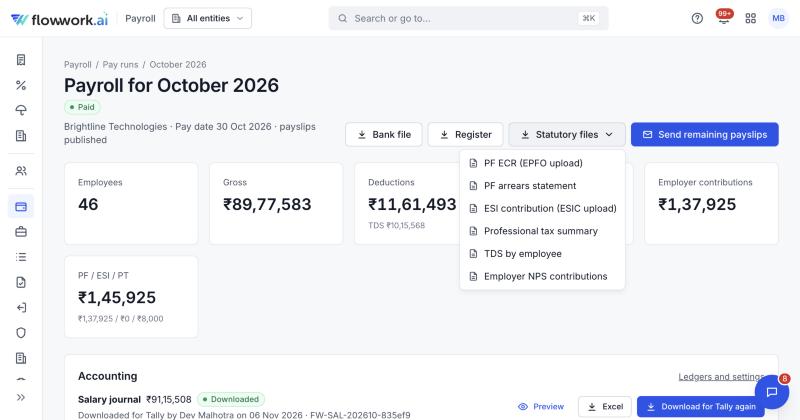
- Select Statutory files.
- Choose a file:
- PF ECR (EPFO upload): the ECR text file for the EPFO portal.
- PF arrears statement: PF arrears paid with this run, per employee and wage month.
- ESI contribution (ESIC upload): the monthly contribution file (.xls) for the ESIC portal.
- Professional tax summary: professional tax by work location and amount.
- TDS by employee: each employee's PAN, tax regime, gross pay and TDS, with the total.
- Employer NPS contributions: employer NPS by employee, for your NPS intermediary.
- For the ECR and ESI files, a dialog first says how many employees the file has and who is left out. Select Download file.
Read the full guide with your flowwork account
The rest of this page has the steps, screenshots and tips. Anyone at a company that uses flowwork can read every page, and ask the Help assistant about it.
Every step, in order Real screenshots The agents that help
New companies use flowwork free until 31 December 2026