
PayrollEmployees and salaries
See employees' salaries
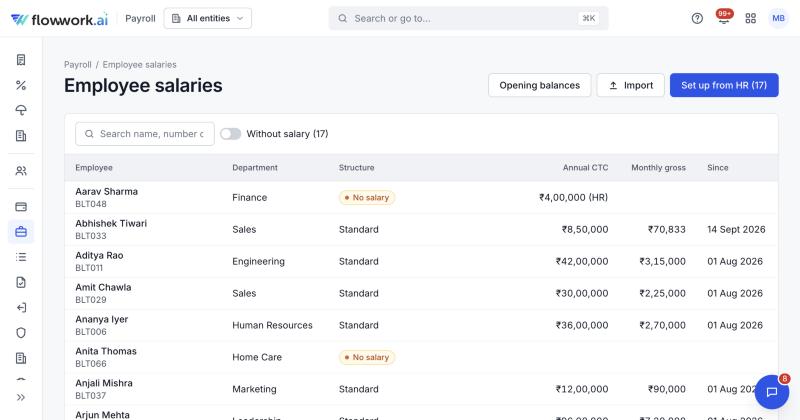
Payroll › Employees lists everyone who works for the company this month, with the salary payroll will pay them. Use it to check who still has no salary, to open one person's payroll record, and to start the salary, import and opening balance tasks.
Before you start
- You need one of these to open the page: View payroll, Manage payroll settings, Run payroll or Approve payroll.
- Only people with Run payroll or Approve payroll can change anything here. Everyone else sees the same page read-only, without the buttons at the top.
- Employees come from People. Someone who isn't in People, or doesn't work for the company this month, isn't listed.
What's on the page
The page title is Employee salaries. Each row shows:
| Column | What it shows |
|---|---|
| Employee | The name (select it to open the employee) and the employee number. |
| Department | From People. |
| Structure | The salary structure of the current salary, or a No salary badge. |
| Annual CTC | The CTC of the current salary. With no salary yet, the CTC from People's compensation with "(HR)" after it, if there is one. |
| Monthly gross | The monthly earnings of the current salary. |
| Since | The date the current salary applies from. |
The buttons at the top (only with Run payroll or Approve payroll):
- Opening balances: import pay from your previous payroll for this financial year. See Opening balances.
- Import: upload salaries and payroll details from a spreadsheet. See Import salaries. It's greyed out until you have at least one salary structure.
- Set up from HR (n): give everyone without a salary one from their CTC in People. It shows only when someone has no salary. See Set up a salary.
Read the full guide with your flowwork account
The rest of this page has the steps, screenshots and tips. Anyone at a company that uses flowwork can read every page, and ask the Help assistant about it.
Every step, in order Real screenshots The agents that help
New companies use flowwork free until 31 December 2026