
PayrollReports and compliance
The Compliance page
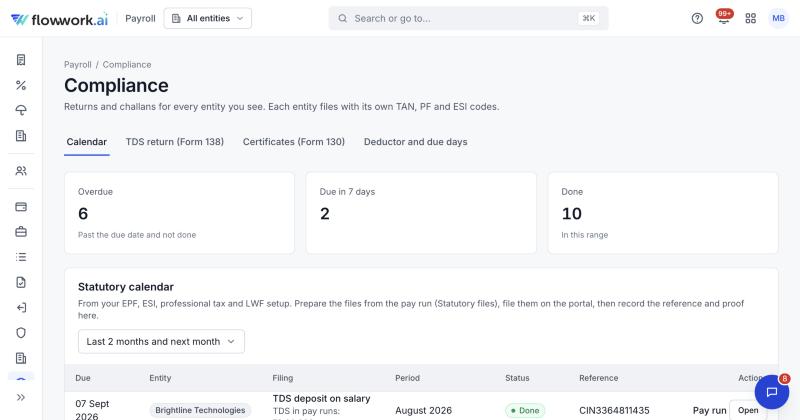
Compliance is where you keep track of your statutory filings and payments: EPF, ESI, TDS on salary, professional tax and labour welfare fund. It shows what is due when, lets you record each filing with its reference and proof, and makes the quarterly TDS return file and the employees' TDS certificates.
From tax year 2026-27 the new Income-tax Act renamed the salary TDS forms. Form 138 is the quarterly TDS return on salary (it was Form 24Q). Form 130 is the employee's certificate of TDS on salary (it was Form 16). The screens use the new names.
Before you start
- Any payroll permission (View payroll, Run payroll, Approve payroll or Manage payroll settings) opens Compliance in the menu.
- What you can do on each tab depends on your permissions. See the table below.
- The calendar is built from your setup: EPF and ESI in Settings › Statutory components, professional tax and LWF on your work locations, and the first payroll month in Pay schedule.
The four tabs
| Tab | What it's for | Page |
|---|---|---|
| Calendar | Every filing and payment with its due date and status. Record each one as filed or done, with the portal's reference and proof files. | Compliance calendar, Record a filing |
| TDS return (Form 138) | Checks a quarter, then downloads the Form 138 text file for Protean's File Validation Utility, plus the data spreadsheet and the salary and tax statement. | TDS returns |
| Certificates (Form 130) | Part C made from the pay runs, Parts A and B uploaded from TRACES, and releasing the certificates to employees. | TDS certificates |
| Deductor and due days | Your TAN, PAN, address and the person responsible, used in the return and the certificates. Your own due days for the calendar. | Deductor details and due days |
Read the full guide with your flowwork account
The rest of this page has the steps, screenshots and tips. Anyone at a company that uses flowwork can read every page, and ask the Help assistant about it.
Every step, in order Real screenshots The agents that help
New companies use flowwork free until 31 December 2026