
PayrollStatutory
Set up labour welfare fund (LWF)
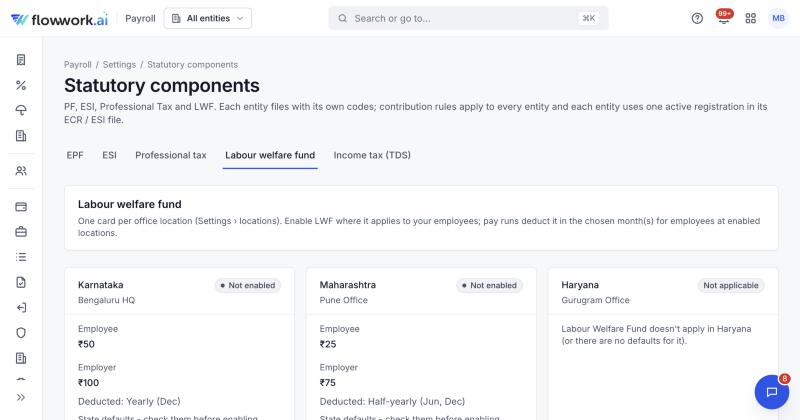
Labour welfare fund is a small state contribution from the employee and the employer, usually once or twice a year. You set it up per office location on the Labour welfare fund tab of Settings › Statutory components. Pay runs deduct it in the months you choose, for employees whose work location has LWF enabled.
Before you start
- You need Manage payroll settings to enable, edit or disable LWF. Others with payroll access can read the tab.
- Your company's office locations must be set up by your admin, and each employee's work location must be set in People.
Steps
- Go to Settings › Statutory components and open the Labour welfare fund tab.
- Find the location's card. A card marked Not enabled shows the state's defaults.
- Select Enable.
- Check the Employee contribution and Employer contribution. These are amounts per deduction, not per year.
- Under Deducted in, tick the month(s). December is ticked if nothing was set.
- Leave Also deduct from employees who leave before the deduction month, in their last month off unless your state requires it. LWF is usually owed for people on the rolls on the due date.
- Select Save and enable. You see "LWF saved", and the card shows Enabled.
To change it later, select Edit on the card. To stop it, select Disable and confirm. The amounts stay saved, but pay runs stop deducting LWF there.
Read the full guide with your flowwork account
The rest of this page has the steps, screenshots and tips. Anyone at a company that uses flowwork can read every page, and ask the Help assistant about it.
Every step, in order Real screenshots The agents that help
New companies use flowwork free until 31 December 2026