
PayrollAgents in Payroll
FnF checker
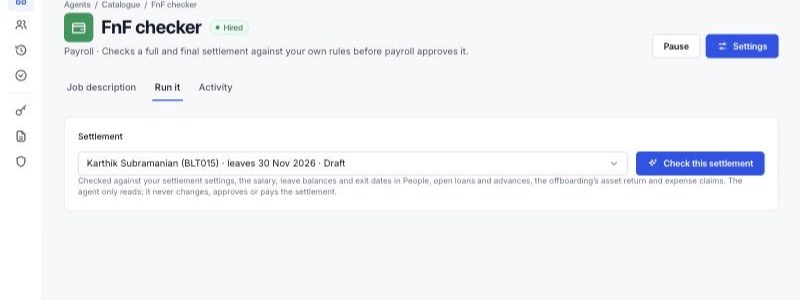
Before a leaver's full and final settlement is approved, pick it here. The agent checks every part against your settlement settings and the employee's data: gratuity eligibility and amount, leave encashment days against the leave balance in People, notice recovery or pay against the notice served, the last month's salary, open loans and advances, assets not returned in the offboarding, expense claims still due, TDS and the tax-free parts, and variable pay. Each finding shows what was expected, what the settlement has and why. It only reads.
Before you start
- The agent must be hired for your company, and you must be allowed to use it.
- You need View employee payroll sensitive data. To pick from the settlement list on the Run it tab you also need Run payroll or Approve payroll.
- Start the settlement in Payroll first. See Settlements.
Check a settlement
- Open Agents › Catalogue › FnF checker and select Run it.
- Under Settlement, choose the leaver. Each option shows the name, employee number, leaving date and the pay run status (or "no pay run yet").
- Select Check this settlement ("Checking every part of the settlement…").
- Read the result:
- The badges: wrong, likely wrong and decide.
- Nothing wrong found, or a brief of what to fix.
- The Findings table: Result (Wrong, Likely wrong, Decide), What, Expected and Settlement has.
- Show the parts that are right lists the checks that passed.
- Fix the settlement in Payroll and approve it there. See The settlement page.
Read the full guide with your flowwork account
The rest of this page has the steps, screenshots and tips. Anyone at a company that uses flowwork can read every page, and ask the Help assistant about it.
Every step, in order Real screenshots The agents that help
New companies use flowwork free until 31 December 2026