
PayrollMy pay
Declare your tax and upload proofs
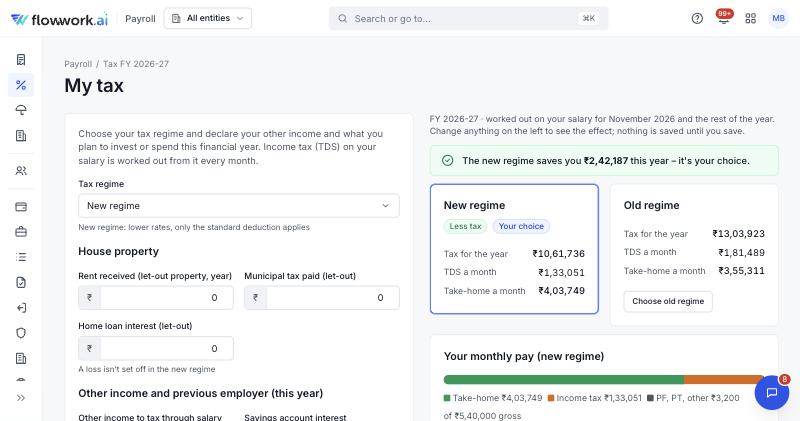
My tax is where you choose your income tax regime for the year and declare your rent, investments and other income. Payroll uses it to work out the tax (TDS) taken from your salary each month. Next to the form you see your tax under both regimes, so you can pick the one that costs you less. Later in the year you upload proofs here too.
Before you start
- Anyone in your company can open My tax. Your account must be linked to your employee record. If it isn't, the page can't load your declaration; ask HR.
- The comparison needs a salary in payroll for the coming month.
Steps
- Go to Me › My tax.
- In Tax regime, choose New regime or Old regime. The new regime is the default.
- Fill in what applies to you. The amounts are for the whole tax year unless the label says a month.
- Old regime only: House rent (rent per month, Metro city, landlord name and PAN), Investments and expenses (80C, own NPS, health insurance for you and your parents, senior citizen switches) and More deductions (80E, 80G, 80EEB, 80U, 80DD).
- House property: home loan interest on the house you live in (old regime only), and rent, municipal tax and loan interest for a let-out property.
- Other income and previous employer (this year): other income such as fixed deposit interest, savings interest, and the salary and TDS from an earlier job this year.
- Watch the panel on the right. It updates as you type.
- Select Save draft to keep your changes, or Submit when you're done. You see "Draft saved" or "Declaration submitted".
Read the full guide with your flowwork account
The rest of this page has the steps, screenshots and tips. Anyone at a company that uses flowwork can read every page, and ask the Help assistant about it.
Every step, in order Real screenshots The agents that help
New companies use flowwork free until 31 December 2026