
Check and change a settlement
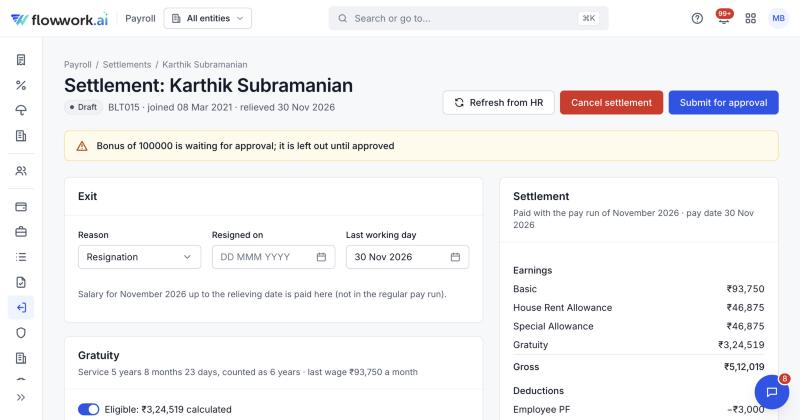
The settlement page shows everything a leaver gets and gives back, and the resulting pay. You change the amounts while the settlement's pay run is a draft, then submit it, approve it and mark it paid like any pay run.
Before you start
- Anyone with a payroll permission can open a settlement and see its amounts.
- To change the amounts, Refresh from HR, Cancel settlement and Submit for approval, you need Run payroll or Approve payroll, and the settlement's pay run must be Draft.
- To Approve, Send back, Reopen and Mark as paid, you need Approve payroll.
What's on the page
The top line shows the pay run's status, the employee number, the joining date and the relieving date. The left column has one card per part of the settlement. The Settlement card on the right shows the result: Earnings, Gross, Deductions, the net, and any employer contributions. Under it, Income tax for the year shows how the year's tax was worked out (old or new regime).
Each change is saved when you select Apply (or Apply days), and the whole settlement is worked out again.
Read the full guide with your flowwork account
The rest of this page has the steps, screenshots and tips. Anyone at a company that uses flowwork can read every page, and ask the Help assistant about it.