
PayrollFull and final settlements
Start a full and final settlement
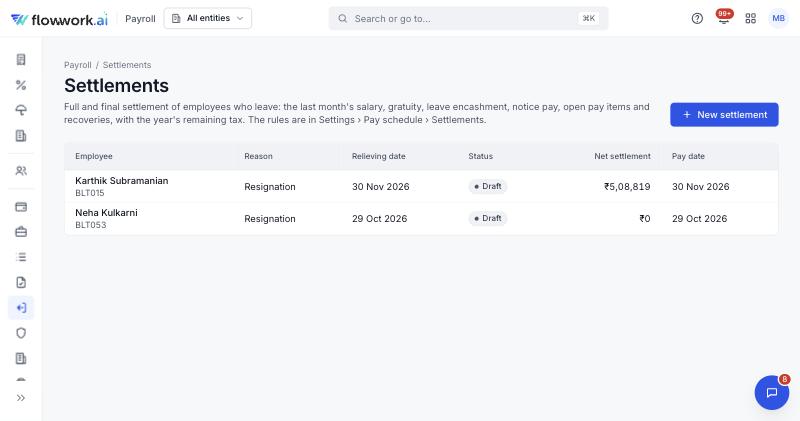
When an employee leaves, their last pay is worked out as a full and final (FnF) settlement: the last month's salary up to the relieving date, gratuity, leave encashment, notice pay, open pay items and recoveries, and the tax still due for the year. Payroll › Settlements lists every settlement and is where you start a new one.
Before you start
- To see the list you need any payroll permission. To start a settlement you need Run payroll or Approve payroll.
- The employee must have a payroll salary, because the list of people comes from Payroll › Employees.
- Their exit should be in HR. Starting their offboarding in People gives payroll the resignation date, the last working day and the relieving date. If HR has no relieving date yet, you can type one.
- Check the settlement rules in Settings › Pay schedule (gratuity, leave encashment, notice period, how the settlement is paid). See Settlement rules below.
- If the month's regular pay run is Awaiting approval and has the employee, send it back or approve it first. A settlement can't be started while it waits.
Steps
- Go to Payroll › Settlements.
- Select New settlement.
- In Employee, search by name or employee number and pick the person.
- Choose the Reason: Resignation, Termination, Retirement, Death or disablement or Other.
- Leave Relieving date empty to use the date from the employee's offboarding in HR, or pick a date.
- Select Create. While it works, the button says Working it out….
The settlement page opens with the amounts already worked out. Check and change them there. See Check and change a settlement.
Read the full guide with your flowwork account
The rest of this page has the steps, screenshots and tips. Anyone at a company that uses flowwork can read every page, and ask the Help assistant about it.
Every step, in order Real screenshots The agents that help
New companies use flowwork free until 31 December 2026