
PayrollPay runs
Off-cycle and mid-month runs
Besides the regular run, a month can have extra runs:
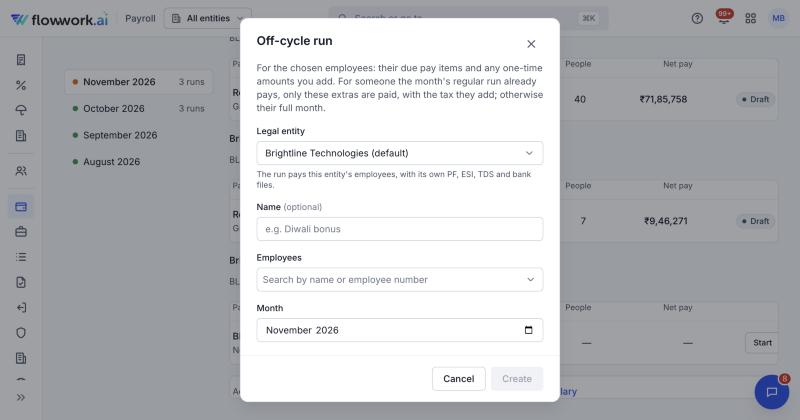
- Off-cycle run: an extra run for chosen employees, for example a festival bonus, a correction, or a salary the regular run didn't pay.
- Mid-month salary: pays part of the month's salary in the middle of the month. The regular run deducts it.
For expense claims paid with salary, see Pay expense claims with salary.
Before you start
- You need Run payroll or Approve payroll.
- For a mid-month run, set the default % and day in Settings › Pay schedule › Mid-month salary (by default 50% on the 15th). A pay group can have its own %. See Pay schedule and Pay groups.
Start an off-cycle run
- Go to Pay runs and pick the month.
- Under the run list, select Off-cycle (in Add a run for (month):).
- Type a Name, for example "Diwali bonus". Optional; the default is "Off-cycle run".
- Choose the Employees.
- Check the Month and select Create.
- In the run, open each employee and add the amounts as One-time items, or select Bonuses and pay items to add pay items for many people. See Loss of pay and other inputs and Pay items.
- Submit and approve it like any run. See Submit and approve a pay run.
Read the full guide with your flowwork account
The rest of this page has the steps, screenshots and tips. Anyone at a company that uses flowwork can read every page, and ask the Help assistant about it.
Every step, in order Real screenshots The agents that help
New companies use flowwork free until 31 December 2026