
PayrollSetup
Payroll settings
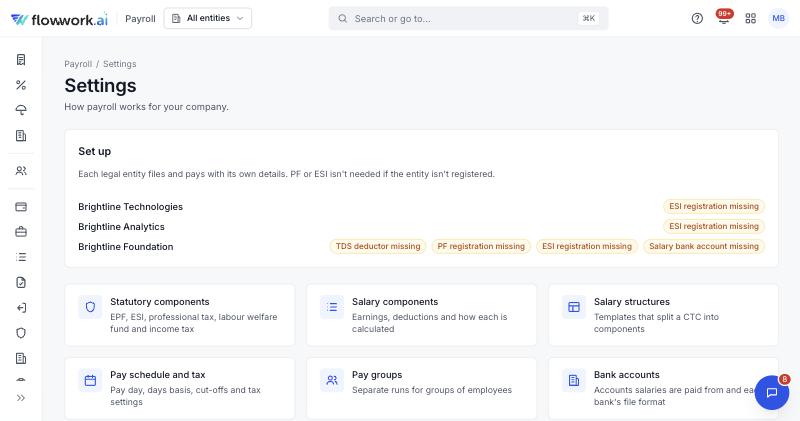
Settings is where you decide how payroll works for your company: which statutory deductions apply, how salaries are split into components, when salaries are paid, which accounts pay them and what payslips look like.
Before you start
- Settings is in the Admin group of the menu for anyone with View payroll, Run payroll, Approve payroll or Manage payroll settings.
- Only Manage payroll settings can change anything. Everyone else sees the pages read-only, without Save, New or Delete buttons.
What's on the page
Each card opens one settings page:
| Card | What you set there |
|---|---|
| Statutory components | EPF, ESI, professional tax, labour welfare fund and income tax. See EPF, ESI, Professional tax, Labour welfare fund and How TDS works. |
| Salary components | Earnings, deductions and employer benefits, and how each is calculated. See Salary components. |
| Salary structures | Templates that split a CTC into components. See Salary structures. |
| Pay schedule and tax | Pay day, part-month pay, approvals, payslip password, settlements and payment safety checks. See Pay schedule. |
| Pay groups | Separate runs for groups of employees. See Pay groups. |
| Bank accounts | Accounts salaries are paid from, and each bank's file format. See Bank accounts. |
| Payslip templates | Word templates and the logo for payslips. See Payslip templates. |
| Pay item types | Bonuses, recoveries, loans and who approves them. See Pay item types. |
| Insurance policies | Group health and other policies, premiums and cover. See Insurance policies. |
Read the full guide with your flowwork account
The rest of this page has the steps, screenshots and tips. Anyone at a company that uses flowwork can read every page, and ask the Help assistant about it.
Every step, in order Real screenshots The agents that help
New companies use flowwork free until 31 December 2026