
PayrollStatutory
Set up EPF (provident fund)
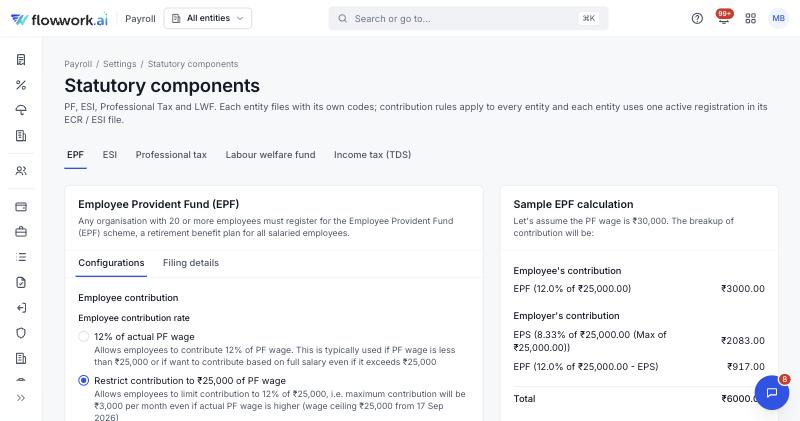
The EPF tab of Settings › Statutory components is where you switch on provident fund for your company and choose how contributions are worked out. Once EPF is on, every pay run deducts the employee's PF and adds the employer's PF, EPS, EDLI and admin charges for each employee who is a PF member.
Before you start
- You need Manage payroll settings to switch EPF on or change it. People with View payroll, Run payroll or Approve payroll can open the tab and read it, but the server refuses their changes.
- Have your PF establishment details ready: the name, the registration date and the establishment ID (Est ID).
- Each employee's PF membership, UAN, PF number and "PF on actual wage" are set per person. See Payroll details.
Steps
- Go to Settings › Statutory components. The EPF tab opens first.
- If EPF isn't set up, you see Are you registered for EPF?. Select Enable EPF.
- On Basic details, choose the options (see the next section), then select Next.
- On PF statutory details, add your establishment: Name, Registration date and Registration number (Est ID). All three are required.
- Select Add & enable EPF. You see "EPF added and enabled".
To change the settings later, open the Configurations tab, change what you need and select Save changes. Discard changes puts back the saved settings. To add, edit or delete an establishment, use the Filing details tab. Each change there is saved at once.
Read the full guide with your flowwork account
The rest of this page has the steps, screenshots and tips. Anyone at a company that uses flowwork can read every page, and ask the Help assistant about it.
Every step, in order Real screenshots The agents that help
New companies use flowwork free until 31 December 2026