
PayrollReports and compliance
Prepare the quarterly TDS return (Form 138, was 24Q)
Every quarter you file a statement of the TDS you deducted from salaries. From tax year 2026-27 this statement is Form 138 under the new Income-tax Act; until then it was Form 24Q. Payroll checks the quarter and makes the text file you run through Protean's File Validation Utility (FVU), plus spreadsheets for your CA.
Before you start
- You need Run payroll or Approve payroll. To check the quarter and download the Form 138 file you also need View employee payroll sensitive data, because the file carries employees' full PANs.
- Fill in the deductor details: TAN, PAN, address and the person responsible.
- Record each month's TDS deposit with its challan (BSR code, date, serial number, tax) on the calendar. See Record a filing.
- Every approved pay run of the quarter must be marked paid or have a pay date. Employees are reported by the date their salary was paid.
Steps
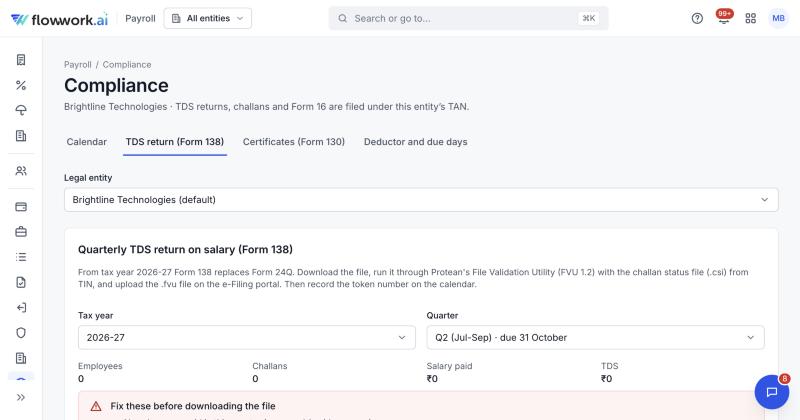
- Go to Compliance and select the TDS return (Form 138) tab. With several legal entities, choose the entity: each files under its own TAN.
- Choose the Tax year and the Quarter. The tab opens on the last finished quarter.
- Payroll checks the quarter and shows Employees, Challans, Salary paid and TDS.
- If you see Fix these before downloading the file, fix each problem and come back. Common ones:
- "Approved pay runs without a pay date or payment … mark them paid or set the pay date"
- "Deductor details: … is missing"
- "Record the TDS challan of … on the Compliance page", or the challan is incomplete or less than the TDS of its employees
- "Enter the 15-digit token number of the previous Form 138 on the Compliance page"
- "No salary was paid in this quarter"
- Read Check these (for example an employee without a valid PAN, reported as PANNOTAVBL). These don't block the file.
- When you see Ready to download, select Form 138 file (Q1) (or Q2, Q3).
- Run the file through Protean's FVU 1.2 with the challan status file (.csi) from TIN. FVU has the final word on the format.
- Upload the .fvu file on the e-Filing portal.
- Back on the Calendar, open the TDS return (Form 138) row and record the Token number. See Record a filing.
Read the full guide with your flowwork account
The rest of this page has the steps, screenshots and tips. Anyone at a company that uses flowwork can read every page, and ask the Help assistant about it.
Every step, in order Real screenshots The agents that help
New companies use flowwork free until 31 December 2026