
PayrollSetup
Salary structures
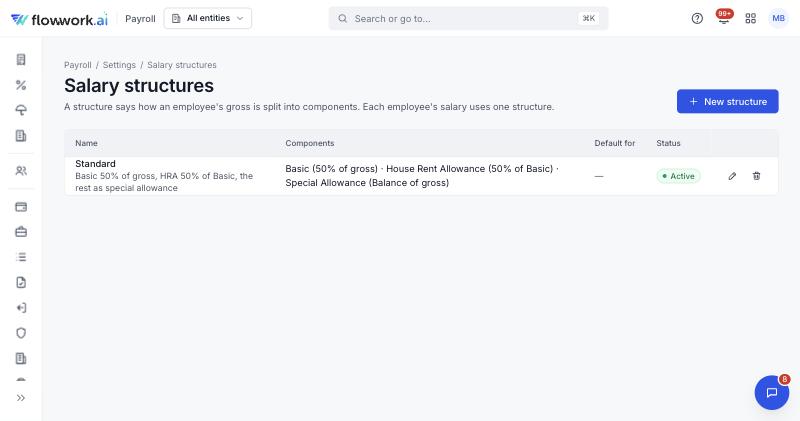
A salary structure says how an employee's gross is split into components, for example Basic 50% of gross, HRA 50% of Basic and the rest as special allowance. Each employee's salary uses one structure. You enter the employee's annual amounts, and the structure works out the monthly breakup.
Before you start
- You need Manage payroll settings.
- Add the components you need first. See Salary components.
- A Standard structure is created with the built-in components: Basic 50% of gross, HRA 50% of Basic, the rest as special allowance.
Add a structure
- Go to Settings › Salary structures.
- Select New structure.
- Fill in Name (for example "Staff") and, if you like, Description.
- Under the components table, choose each component in Add component. The table groups them as Fixed: the monthly gross, Variable pay (part of the CTC), Employer benefits (part of the CTC) and Deductions.
- For each component, keep Default in the calculation column, or choose another calculation for this structure and type its value. Use the arrows to change the order, and the delete button to remove one.
- Under Default structure for, choose the Pay groups and Employment types this structure is the default for. Leave both empty if it's never a default.
- Keep Active (can be given to employees) on.
- Check the Preview (below).
- Select Save.
Read the full guide with your flowwork account
The rest of this page has the steps, screenshots and tips. Anyone at a company that uses flowwork can read every page, and ask the Help assistant about it.
Every step, in order Real screenshots The agents that help
New companies use flowwork free until 31 December 2026