
PayrollAgents in Payroll
Payroll pre-run check
Before you approve a pay run, pick it here. The agent compares every employee with the last approved run of the same pay group and lists what stands out: no bank account, zero or negative pay, people missing from the run, joiners and leavers paid for the full month, big net pay changes with their likely reason, loss-of-pay spikes and pay items still waiting. It then writes a short brief. It only reads: you approve in Payroll.
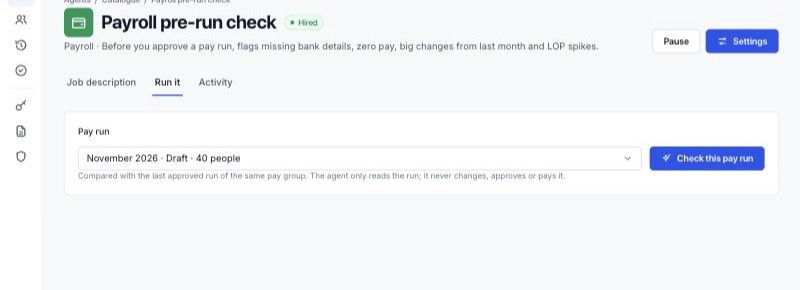
Before you start
- The agent must be hired for your company, and you must be allowed to use it.
- You need a payroll permission that lets you see pay runs: View payroll, Run payroll, Approve payroll or Manage payroll settings. Without one you see "You don’t have access to pay runs".
Check a pay run
- Open Agents › Catalogue › Payroll pre-run check and select Run it.
- Under Pay run, choose the run. Each option shows the month, the run's name, the pay group, the status (Draft, Waiting for approval, Approved or Paid) and the number of people. The first draft or waiting run is chosen for you.
- Select Check this pay run. It takes a few seconds ("Comparing every employee with last month…").
- Read the result:
- The badges: check first, worth a look and for info.
- The people and net pay of this run, and of the last approved run it compared with.
- The brief.
- The What to check table: Priority, Employee and What stands out. If nothing stands out you see Nothing stands out.
- Fix what needs fixing on the pay run, then approve it in Payroll. See Submit and approve a pay run.
Read the full guide with your flowwork account
The rest of this page has the steps, screenshots and tips. Anyone at a company that uses flowwork can read every page, and ask the Help assistant about it.
Every step, in order Real screenshots The agents that help
New companies use flowwork free until 31 December 2026