
PayrollInsurance
Enrol employees and manage insurance cover
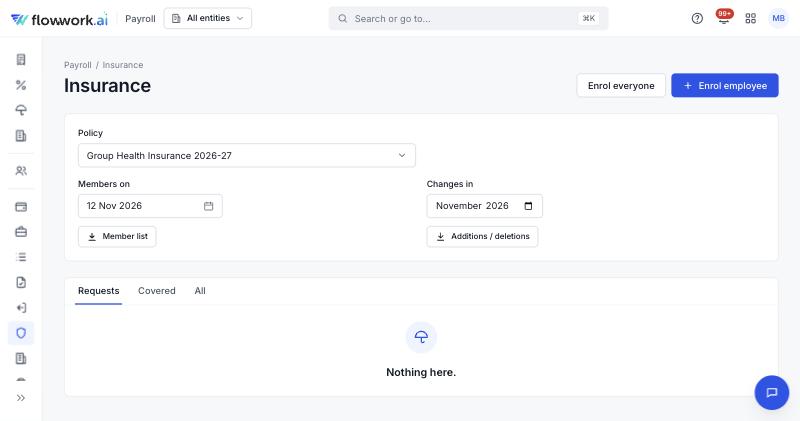
Payroll › Insurance is where payroll approves employees' requests for cover, enrols employees, ends cover, adds e-cards and downloads the member lists the insurer asks for.
Before you start
- Add the policy first in Settings › Insurance policies. See Set up group insurance policies. Without one, the page says No policies yet.
- Anyone with a payroll permission can open the page, see who is covered, download the member lists and open e-cards.
- To enrol, approve, reject, end cover and add or delete e-cards you need Run payroll or Approve payroll.
- Family members come from the employee's family details in People. Add them there, or the employee adds them in My insurance.
What's on the page
- Policy: the policy you're looking at.
- Members on and Member list: everyone insured on a date, as an Excel file.
- Changes in and Additions / deletions: who was added or removed in a month, as an Excel file.
- Tabs Requests (waiting for HR, with a count), Covered and All.
The table shows Employee, Members ("Employee only" or each family member with their relation), Sum insured, Cover (from and to), Premium, Employee pays (with "from CTC", the parents' part and any refund), and Status: Waiting for HR, Covered, Rejected, Ended or Withdrawn.
Read the full guide with your flowwork account
The rest of this page has the steps, screenshots and tips. Anyone at a company that uses flowwork can read every page, and ask the Help assistant about it.
Every step, in order Real screenshots The agents that help
New companies use flowwork free until 31 December 2026