
PayrollReports and compliance
Deductor details and due days
Your company is the deductor of TDS on salary. Its TAN, PAN, address and the person responsible for deducting tax go into the quarterly TDS return (Form 138, was 24Q) and onto the TDS certificates (Form 130, was Form 16). On the same tab you can set your own due days for the compliance calendar.
Before you start
- Everyone with payroll access can see this tab. Only people with Manage payroll settings can change it.
- Keep your TAN registration details at hand: enter them exactly as registered.
Fill in the deductor details
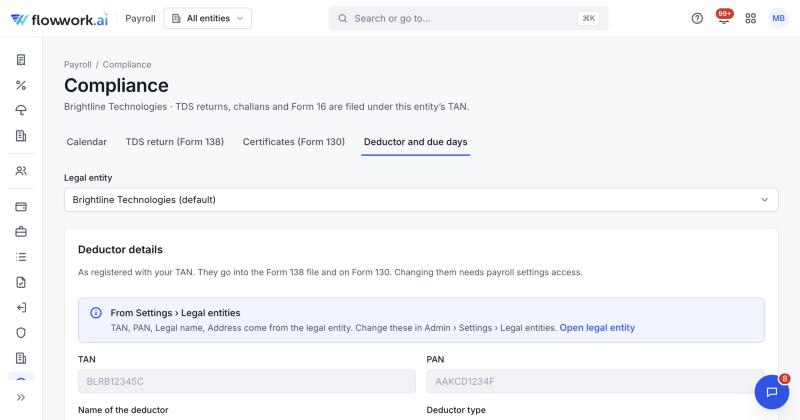
- Go to Compliance and select Deductor and due days. With several legal entities, choose the entity.
- Check the warning Still needed for the TDS return: it lists what's missing.
- Fill in TAN, PAN, Name of the deductor (up to 75 characters) and Deductor type (for example Company, Firm, Individual / HUF).
- Add Branch / division and GSTIN if you have them, then Email and Contact number.
- Fill in the address: Flat / door / block, Building, Road / street, Area / locality, Town / city / district, State and PIN code. Each line holds 25 characters.
- Tick The address changed since the last return if it did.
- Under Person responsible for deducting tax, fill in Name, Designation (at most 20 characters), PAN, Father's name (printed in the verification of Form 130), Email, Contact number and the address.
- Select Save deductor details.
Read the full guide with your flowwork account
The rest of this page has the steps, screenshots and tips. Anyone at a company that uses flowwork can read every page, and ask the Help assistant about it.
Every step, in order Real screenshots The agents that help
New companies use flowwork free until 31 December 2026