
PayrollMy pay
Check my insurance and ask for cover
My insurance shows the group insurance policies your company has, whether you are covered, what you pay, and your e-cards. If your company allows it, you can ask HR to cover you and your family, or change your cover.
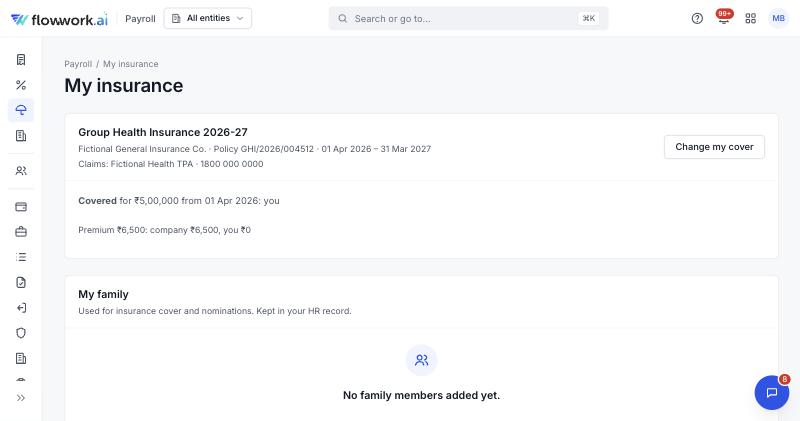
Before you start
- Every employee can open My insurance.
- Add your family members under My family first. Only the relations a policy covers can be chosen.
- Add your family members' dates of birth. Insurers need them, and some policies price by age.
What's on the page
For each active policy:
- The name, insurer, policy number and period, the claims TPA and helpline, and a Policy details link if HR added one.
- Covered for the sum insured from a date, with the family members covered, or "You aren't covered yet".
- The premium split: the company's part and yours, and how yours is paid: "deducted from your salary; counted under 80D for income tax" or "paid from your CTC: taken off your salary before tax".
- E-cards: download buttons for your health cards.
- A request waiting for HR, with Withdraw.
- If cover ended and part of your yearly share is paid back: "Cover ended …: ₹… of your share for the unused months is paid back with your salary".
- If your last request was rejected, HR's reason.
At the bottom, My family lists your family members, kept in your HR record.
Read the full guide with your flowwork account
The rest of this page has the steps, screenshots and tips. Anyone at a company that uses flowwork can read every page, and ask the Help assistant about it.
Every step, in order Real screenshots The agents that help
New companies use flowwork free until 31 December 2026